
Our methodology is simple: every StudentScoreTools calculator uses a published formula, shows that formula on the tool page, and is checked against examples worked by hand before and after changes. GPA and grade tools follow standard arithmetic, while AP score tools give clearly labeled, unofficial estimates.
This methodology page explains how all 24 free calculators for GPA, class grades, final exams, class rank and AP scores are designed, tested, updated and corrected, so you can judge for yourself how far to trust a result.
Methodology quick answer
- Formulas: published on the tool page and repeated below.
- Testing: outputs are compared with hand-calculated examples.
- Estimates: AP results are labeled unofficial; only College Board issues AP scores.
- School rules: grading scales are editable because every school sets its own policy.
- Corrections: report a wrong result through the contact page.
- Last reviewed: October 18, 2026.
What this methodology covers
This methodology applies to every calculator in four groups: GPA calculators, grade calculators, the class rank percentage calculator, and AP score calculators. It also covers our college and graduate school GPA tools.
The goal is to help students and parents understand their numbers and plan their next step. The goal is not to replace your school. Official grades, GPAs, transcripts and AP scores always come from your school or from College Board.
Our 5-step calculator methodology
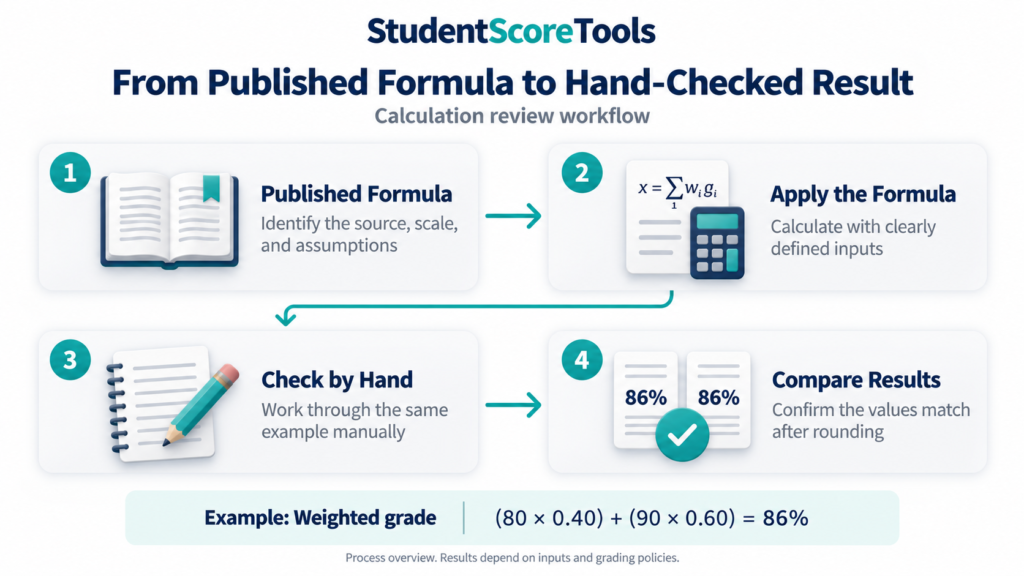
Each calculator goes through the same five steps. Following one repeatable method keeps results consistent across tools.
- Define one question. A tool answers a single question, such as “What is my weighted GPA?” or “What do I need on the final?”
- Publish the formula. The formula and a worked example appear on the tool page, so you can repeat the math by hand.
- Build with editable inputs. Where schools differ, such as plus and minus values or honors weighting, the grading scale can be edited to match your school.
- Hand-check the output. Results are compared with examples calculated by hand, including simple cases and edge cases.
- Label and review. Results are described as estimates for planning, and tools are reviewed again when a formula, scale or exam scoring model changes.
Core formulas in our methodology
Four formulas answer most grade questions. Each one below is the same formula used inside the matching calculator.
GPA formula
GPA = total quality points ÷ total credits
Quality points are grade points multiplied by credits. On the unweighted 4.0 scale, an A is 4.0 and a B is 3.0. For example, A (4.0 × 1 credit), B (3.0 × 1 credit), A (4.0 × 1 credit) and C (2.0 × 0.5 credit) give 12.0 quality points over 3.5 credits, which is a 3.43 GPA. Try it in the High School GPA Calculator.
Cumulative GPA update formula
New GPA = (current GPA × credits earned + new quality points) ÷ (credits earned + new credits)
This weights your existing GPA by the credits behind it, so a new semester moves a long record less than a short one. Use the GPA Calculator With Current GPA.
Weighted class grade formula
Grade = Σ(score × weight) ÷ Σ(weights)
Use it when homework, quizzes and tests count for different percentages. For example, 80% at weight 40 and 90% at weight 60 give (3,200 + 5,400) ÷ 100 = 86%. Try the Grade Calculator With Weight.
Final exam grade formula
Needed = (target − current × (1 − final weight)) ÷ final weight
Write the final’s weight as a decimal. With a current grade of 84%, a target of 85% and a final worth 25%, you need (85 − 63) ÷ 0.25 = 88%. Try the Final Grade Calculator.
Class rank percentage formula
Top % = rank ÷ class size × 100
Rank 25 in a class of 400 is 6.25%, so the student is in the top 6.25%. Schools differ on whether they report a rank or a percentile, and some do not rank at all. Use the Class Rank Percentage Calculator.
Hand-checked test cases
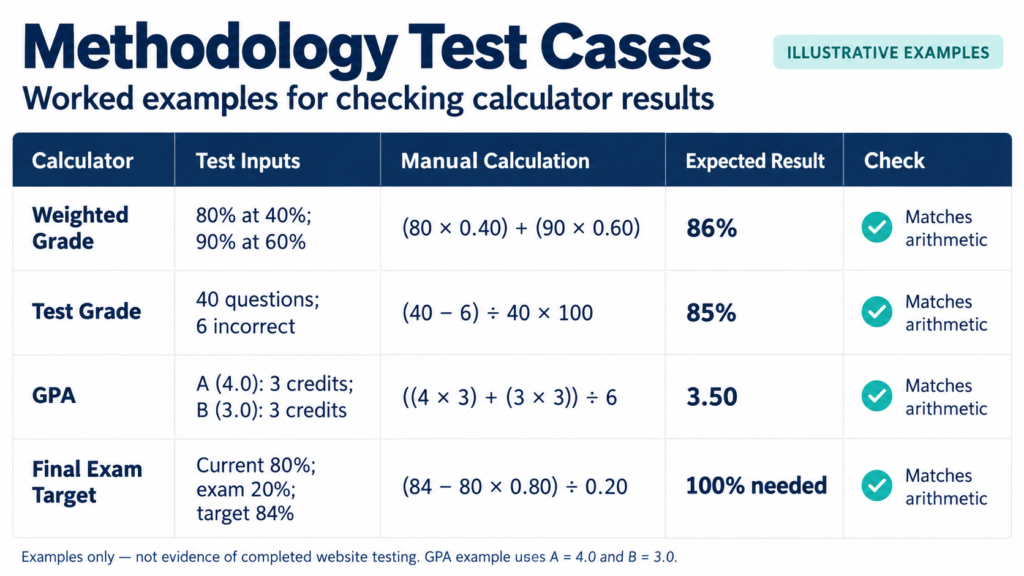
Before a calculator goes live, and again after a change, its output is compared with a worked example. These four cases are part of that methodology.
| Calculator | Input | Expected result |
|---|---|---|
| Grade Calculator With Weight | 80% at weight 40, 90% at weight 60 | 86% |
| GPA Calculator With Current GPA | Two equal-credit courses: A (4.0) and B (3.0) | 3.50 GPA |
| Final Grade Calculator | Current 84%, target 85%, final worth 25% | 88% needed on the final |
| Class Rank Percentage Calculator | Rank 25 in a class of 400 | Top 6.25% |
GPA scales and school policy in our methodology
Most US high schools use an unweighted 4.0 scale, and many also report a weighted GPA that adds points for honors and AP courses. Our default scale is a common pattern, not a universal rule.
| Letter grade | Unweighted (4.0) | Honors (common +0.5) | AP or IB (common +1.0) |
|---|---|---|---|
| A | 4.0 | 4.5 | 5.0 |
| B | 3.0 | 3.5 | 4.0 |
| C | 2.0 | 2.5 | 3.0 |
| D | 1.0 | 1.5 | 2.0 |
| F | 0.0 | 0.0 | 0.0 |
Schools differ in plus and minus values (is a B+ 3.3 or 3.0?), the size of honors and AP bonuses, whether a D earns a bonus, credits per class, and which courses count. Because of this, our methodology lets you change the scale. Check your student handbook or ask your school counselor, then enter the same values so your result matches your school’s method.
AP score estimate methodology
An AP score calculator estimates a 1-5 score by combining your section results into a composite score, then converting that composite using cut scores. Our AP methodology is built on three rules.
- Exam-specific weights. Each AP exam weights multiple-choice and free-response sections differently, so every exam has its own calculator, such as the AP Calculus AB, AP Calculus BC and AP Lang tools.
- A stated exam-year model. Conversion uses a documented exam-year scoring model. College Board sets scoring for each exam year, so cut scores can shift.
- Every result is an estimate. Treat the output as a rough range and use College Board for your official score.
StudentScoreTools is not affiliated with or endorsed by College Board. AP® is a trademark registered by College Board.
Sources and references
Our methodology relies on standard arithmetic that can be verified by hand, plus official sources for anything we cannot define ourselves. For AP exams, see College Board AP Central. For general education statistics, see the National Center for Education Statistics. For your own GPA scale, class rank policy and credit values, your school’s handbook is the authority.
Limits of this methodology
We want you to know what our calculators cannot do:
- Results are estimates for planning, not official grades, GPAs, transcripts or AP scores.
- Your school’s grading policy overrides any default scale.
- AP estimates can differ from real scores because cut scores change by exam year.
- No result guarantees college admission, placement or a scholarship decision.
Read our full disclaimer and editorial policy for more detail, and learn who is behind the site on the About page.
Corrections and update policy
If a calculator result looks wrong, tell us through the StudentScoreTools contact page. Include the page URL, the inputs you entered, and the result you expected. We compare your example with a hand calculation, fix confirmed errors, and re-run the test cases for that tool.
We review a calculator again when its formula, default scale or exam scoring model changes. The “last reviewed” date on this page shows when this methodology was most recently updated: October 18, 2026.
Methodology FAQ
What is the StudentScoreTools methodology?
The StudentScoreTools methodology is a repeatable five-step process: define one question, publish the formula, build with editable inputs, hand-check the output, and label and review each result. It applies to all 24 calculators.
How are the calculators tested?
Each calculator’s output is compared with examples worked by hand, such as 80% at weight 40 and 90% at weight 60 giving 86%. The tests are repeated after a change to the tool.
Are the results official?
No. Results are estimates for planning. Your school issues official grades, GPAs and class rank, and College Board issues AP scores.
Why can my school’s GPA differ from the calculator?
Schools set their own plus and minus values, honors and AP weighting, credit values and counted courses. Edit the grading scale to match your school’s policy, then recalculate.
How accurate are the AP score calculators?
They give an estimate based on a documented exam-year scoring model. Because College Board can change cut scores each year, treat the result as a rough range, not a prediction.
Do I need an account to use the calculators?
No. All calculators are free and need no account or sign-up. Our Privacy Policy explains what data the site collects.
How do I report a wrong result?
Use the contact page and include the page URL, your inputs and the result you expected. We will check it against a hand calculation.
How often is the methodology updated?
We review it whenever a formula, scale or AP scoring model changes. The last review date is shown on this page.
Explore the calculators built with this methodology
- High School GPA Calculator
- Grade Calculator With Weight
- Final Grade Calculator for High School
- Class Rank Percentage Calculator
- All 24 calculators